Get Started
AI quick start
Clone the starter repository:
Launch your coding agent inside bombe-poc and enter:
Read
AGENTS.mdand use thebombeskill. Help me build and test a BOMBE binary. Ask me whenever my input is required.
Prefer working manually? Follow these steps:
Write your code
If you don't know how to write, you can start from our sample code https://github.com/bombe-match/bombe-poc. Our sample code is written in C# and targets .NET 6.0. You can use Visual Studio or the .NET SDK on Linux to compile the Windows x64 binary.
Don't forget to replace the secret
Remember to replace the secret with your own secret!
Every user will have a unique secret, you need to send it with your answer.
The secret used in the sample and test environment is 00000000000000000000000000000000.
Test your code
The public Windows playground AMI is ami-0673d4903c39618b3 in us-west-2.
It includes the BOMBE Test Lab, the documented flag targets, public sample
opponents, and two diagnostic dummy processes. It intentionally does not copy
production Battle orchestration, bots, timing, or decoys.
Remember to switch region
You need to switch your region to us-west-2 in order to use our AMI.
The quickest launch path uses the scripts in bombe-poc. It requires an AWS
account, configured AWS CLI credentials, and an SSH public key:
The launcher creates a t3.medium without an instance IAM role and allows SSH
only from your current public IP. It prints the instance id and SSH command.
AWS usage is billed to your account until the instance is terminated.
Build the binary with the public test secret
00000000000000000000000000000000, copy it into the VM, then run one of:
C:\BOMBE\TestLab\Run-BombeTest.ps1 -Role MAL -Binary C:\path\player.exe
C:\BOMBE\TestLab\Run-BombeTest.ps1 -Role EDR -Binary C:\path\player.exe
The command prints objective verdicts and writes
C:\BOMBE\TestLab\run\result.json. Exit code 0 means every objective for the
selected role passed. When finished, remove the instance and its dedicated
Security Group:
Inside the environment, we have already placed three flags:
- Registry:
answer_1inHKLM:\SOFTWARE\BOMBE- flag is
BOMBE_MAL_FLAG_11111111111111111111111111111111
- flag is
- Encrypted SQLite database:
C:\Users\bombe\AppData\Local\bhrome\Login Data- flag is
BOMBE_MAL_FLAG_22222222222222222222222222222222 - the
secretused to decrypt the flag is00000000000000000000000000000000
- flag is
- Memory of the specified process:
bsass.exe- flag is
BOMBE_MAL_FLAG_33333333333333333333333333333333 - the Test Lab starts the process before running a test.
- flag is
Submit the binary
After preparing your binary, upload it to the contest website. Each upload gets a new version number and automatically runs through a basic screening Battle. Screening rejects binaries that are obviously invalid, cannot follow the answer submission path, or destabilize the VM. A passing binary becomes Ready.
Coding agents can use the participant CLI to upload an executable, wait for screening, run a Challenge, and retrieve Challenge or Tournament history as structured JSON after you complete a one-time interactive login.
The newest Ready version is selected by default in the UI, but it does not silently replace the version you already entered in a Tournament with.
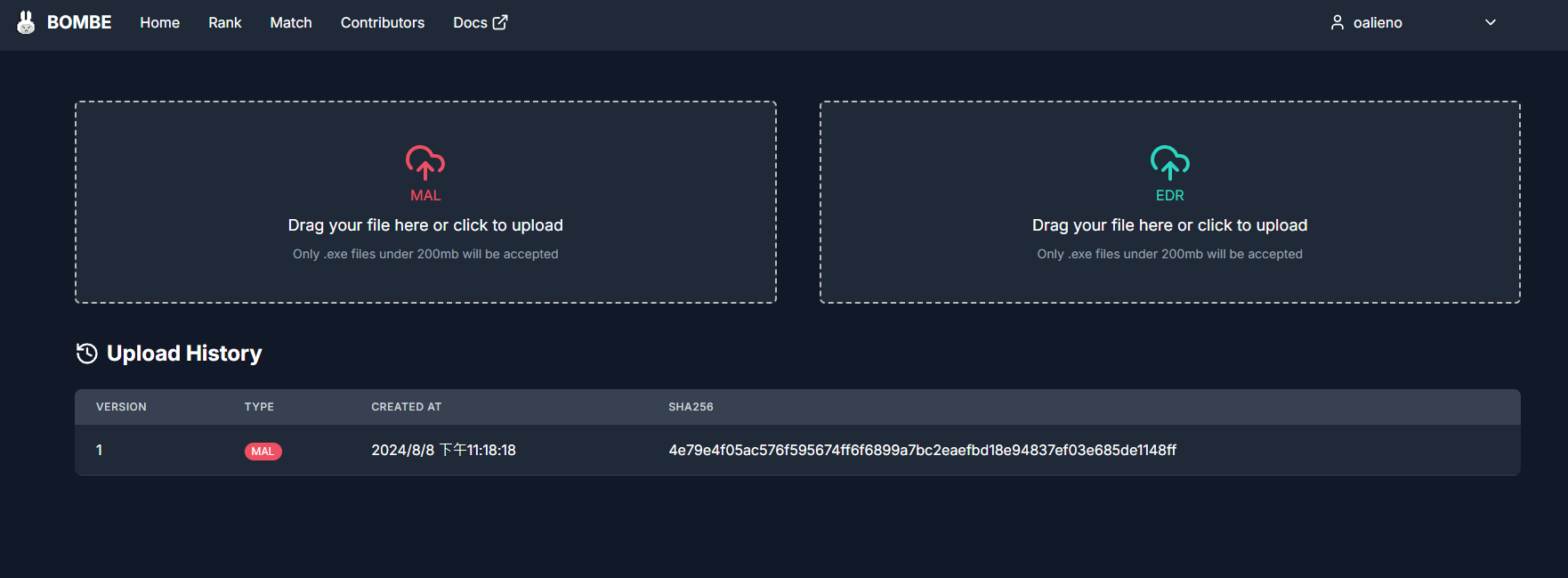
Use a ready binary
- Challenge: choose any Ready binary for the required role and start the
attempt. The newest eligible version is selected by default, and previous
attempts remain available in the website or through
bombe challenge historyandbombe challenge result. - Tournament: while the event is live, explicitly set one Ready Malware
and/or EDR version as active. You may switch active versions during the event;
the platform schedules the required Battles for the new active version.
Completed personal Battles, including superseded versions, are available with
bombe tournament history.
Participant programs must read the private answer API base URL from
BOMBE_SUBMIT_BASE_URL at runtime. See Submission API
before building your binary.
Congrats
Now you know how our game works.
You can refer to our Rules for more information.